

So, what exactly is object storage? At its core, it’s a way to store colossal amounts of data—think photos, videos, backups, and log files—in a way that’s both incredibly scalable and easy on the wallet.
Think of it like a massive digital valet service for your data.
A Valet Parking Lot for Your Data
Imagine pulling up to a gigantic, seemingly endless parking garage. Instead of hunting for a specific spot in a rigid hierarchy (like Floor 3 > Section C > Spot 12), you just hand your keys to a valet.
The valet takes your car (your data), slaps on a detailed tag with everything you’d need to know—make, model, color, and your info (the metadata)—and gives you back a unique claim ticket (a globally unique ID). They then park your car anywhere in the vast, flat expanse of the garage. When you want it back, you don’t need to remember where it is. You just show your ticket.
That’s the magic of object storage. It completely ditches the rigid folder-within-a-folder structure of traditional file systems. Instead, your data is bundled up with rich, searchable metadata into a single unit called an object.
This brilliantly simple model has three main parts:
- The Object: This is the data itself. It could be anything from a tiny text file to a multi-terabyte video.
- The Metadata: This is the descriptive info attached to the object, like its creation date, content type, author, or any custom tags you want to add.
- The Unique ID: A one-of-a-kind address assigned to the object, letting any application find it directly without caring about its physical location on a server.
The table below breaks down these core components using our data valet analogy to make things crystal clear.
Object Storage Core Concepts at a Glance
| Component | Data Valet Analogy | Technical Role |
|---|---|---|
| Object | Your car—the actual item being stored. | The raw data file (image, video, document, etc.). |
| Metadata | The tag with your car’s make, model, and owner info. | Descriptive key-value pairs about the data. |
| Unique ID | Your claim ticket—the only thing you need to get your car back. | The globally unique address used to retrieve the object via an API. |
This “flat” structure is what allows object storage to grow to mind-boggling scales without getting bogged down.
By treating every piece of data as a self-contained object in one massive pool, object storage systems can scale almost infinitely. This architecture is the engine behind modern cloud services, easily handling the exabytes of data our applications generate every day.
This approach is a world away from navigating a tangled mess of directories. Instead of digging through a path like /users/documents/project_files/image.jpg, an application just makes a simple request using the object’s unique ID.
It’s this blend of simplicity, efficiency, and massive scalability that has made object storage the go-to solution for everything from cloud-native apps and big data analytics to media streaming and disaster recovery. It was truly built for the scale of the modern internet.
Object vs. File vs. Block Storage Explained
To really get a feel for object storage, it helps to put it side-by-side with the traditional storage methods we’ve all used for decades. Each type has its own personality, built for very different jobs.
Think of them as three distinct ways to organize a massive library.
This simple diagram shows the core idea behind object storage: the data itself and its descriptive metadata are bundled together into a self-contained unit, which then gets a unique ID. No complex paths, no rigid structures.
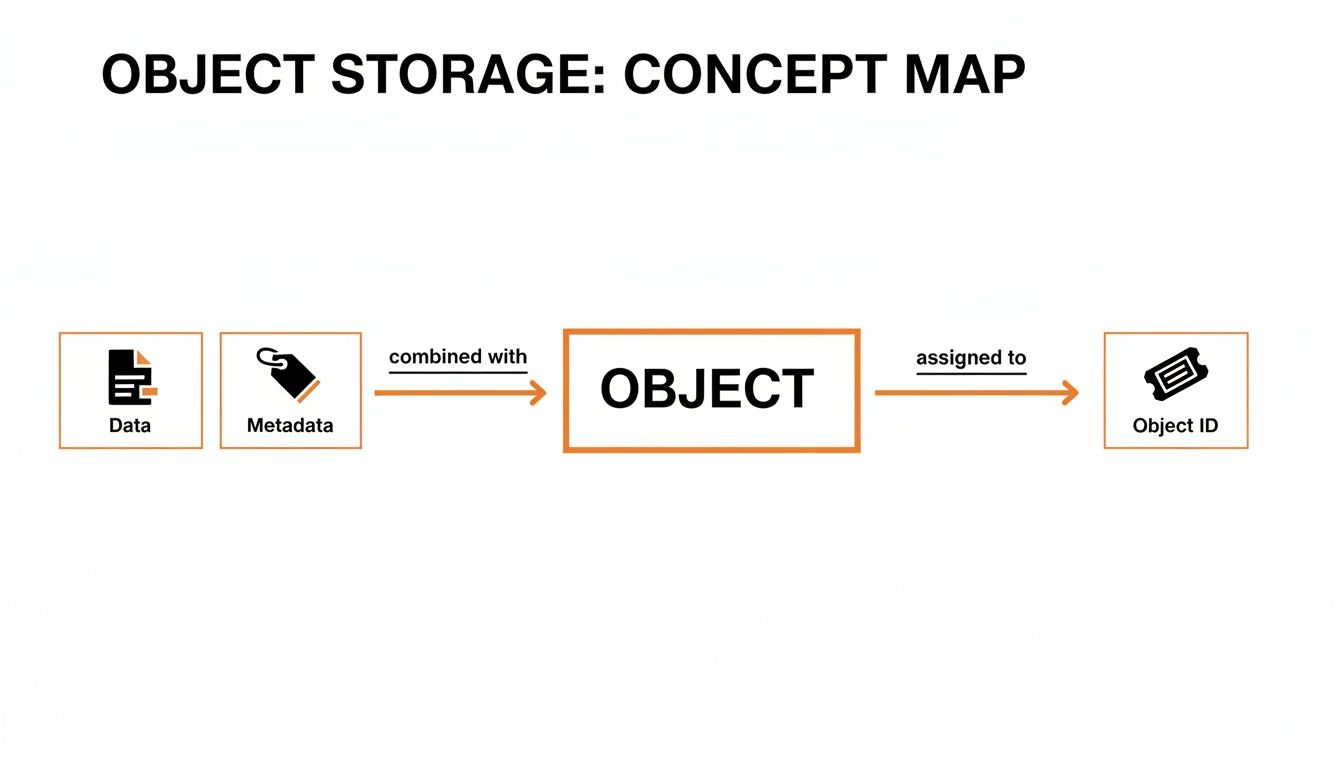
This approach creates “objects” that are incredibly easy to manage, even when you have billions of them. It’s a world away from the constraints of file or block storage.
A Head-to-Head Comparison of Storage Types
Choosing the right storage isn’t just a technical decision—it impacts performance, cost, and how you can grow. This table breaks down the key differences at a glance, showing where each type truly shines.
| Attribute | Object Storage | File Storage | Block Storage |
|---|---|---|---|
| Structure | Flat (objects in a single pool or “bucket”) | Hierarchical (folders and subfolders) | None (data split into fixed-size blocks) |
| Metadata | Rich, customizable, and extensive | Limited (filename, size, created date, etc.) | Very limited (just the block’s address) |
| Access Method | HTTP/API calls (e.g., GET, PUT) | File paths (e.g., C:Documentsfile.txt) |
Direct block address (low-level access) |
| Scalability | Massively scalable (billions of objects) | Limited by the file system’s hierarchy | Limited by the size of the storage volume |
| Best For | Unstructured data: backups, media, archives, web assets | Shared files, local network drives, collaborative documents | Databases, virtual machines, transactional apps |
| Key Advantage | Immense scalability and rich metadata | Simplicity and familiarity | Extreme speed and low latency |
Object storage clearly stands out when you’re dealing with huge amounts of unstructured data, offering a level of scalability and intelligence that other systems just can’t match.
File Storage: The Digital Filing Cabinet
File storage is the one you already know. It’s the digital equivalent of a physical filing cabinet, organizing everything into a neat hierarchy of folders and subfolders. You find what you need by following a specific path, like C:UsersYouDocumentsReport.docx.
This system is perfect for shared files on a local network where teams need to work on the same documents. Its folder-based layout is intuitive for managing a reasonable amount of data.
But what happens when you have millions of files? That rigid hierarchy grinds to a halt, becoming a slow, clunky mess to navigate. For anyone used to this structure, tools that provide a familiar file explorer for S3 can make moving to the cloud feel much more natural.
Block Storage: The High-Performance Building Blocks
Block storage plays a completely different game. It chops data into uniform, fixed-size chunks called blocks, and each block gets its own unique address. It doesn’t know or care what’s inside—it could be a piece of a database or part of an application.
It’s like a warehouse filled with identical, numbered bricks. An application just asks for specific bricks by their number and assembles them into what it needs. This direct-access model makes block storage incredibly fast, which is why it’s the go-to for performance-hungry applications like databases and virtual machines. The trade-offs? It’s more expensive and offers almost no useful metadata.
Object Storage: The Smart Warehouse
And that brings us back to object storage. Picture a massive, modern warehouse with no aisles or shelves. Every item (your data) is packaged with a detailed tag (its metadata) and given a unique ticket number (its ID).
Need to find something? Just show the ticket. A robotic system instantly retrieves the item from wherever it is in that vast space.
This “flat” structure, where every object lives in one giant pool called a bucket, is the secret to its nearly infinite scalability. The rich metadata makes your data searchable and incredibly valuable for analytics. It’s the perfect solution for the mountains of unstructured data that power modern tech—from media content and backups to log files and AI training sets.
How Object Storage Works Under the Hood
To really get what makes object storage so powerful, you have to peek behind the curtain. Forget everything you know about nested folders. Object storage uses a flat address space—think of it as one massive, open warehouse where billions or even trillions of items can live side-by-side.
This flat structure completely gets rid of the slowdowns you see in traditional file systems when you have deep, complicated folder trees. Instead of digging through folders to find a file, an application just asks for an object by its unique ID and gets it instantly, no matter where it’s physically stored. It’s a system built from the ground up for massive scale.

The Language of the Cloud: RESTful APIs
So, how do apps talk to this giant pool of data? They use RESTful APIs. This is just a fancy way of saying they use the same language as the web—standard HTTP—to manage data with a few simple, universal commands.
Instead of wrestling with complex file system commands, developers use dead-simple HTTP requests to work with objects. This API-first design is the universal language of the cloud, making object storage a natural fit for pretty much any web app, mobile app, or cloud service out there.
The most common operations are super straightforward:
- PUT: Uploads a new object or replaces an old one.
- GET: Grabs an object from storage.
- DELETE: Permanently removes an object.
- LIST: Shows you what objects are inside a container.
This simple, standard way of accessing data is why object storage plugs so easily into modern workflows. If you’re working with AWS, our guides on AWS S3 are packed with real-world examples of how these API calls work in practice.
Buckets, Durability, and Consistency
To keep this massive data pool organized and safe, object storage leans on a few key concepts.
First up is the bucket. A bucket is basically a container for grouping related objects. Think of it as a main folder where you can set universal rules for access, versioning, and other policies that apply to everything inside.
Next is durability—the system’s promise that your data won’t get lost. Object storage delivers mind-boggling durability, often touted as 99.999999999% (that’s eleven 9s!), using a clever technique called erasure coding. It slices data into fragments, adds some redundant pieces, and scatters them across tons of different drives and servers. If one drive dies, the system just rebuilds the missing data from the remaining fragments. No sweat.
The flat address space and API-first approach are what give object storage its incredible scale. But it’s the rock-solid durability and consistency models that make it a truly reliable home for your most important data.
Finally, there’s consistency. This is all about how quickly a change—like an upload or deletion—shows up everywhere in the system. Many object storage platforms use what’s called an eventual consistency model. It means that when you write a new object, it’s saved safely right away, but it might take a brief moment for that new version to appear across the entire global network. This trade-off is what allows for unbelievable scale and availability, keeping the system fast and responsive.
Why Modern Technology Runs on Object Storage
The core ideas behind object storage—things like its flat structure and rich metadata—are exactly why it’s become the go-to for building modern apps. Its knack for handling huge, messy datasets isn’t just a neat trick; it’s the engine running the services we depend on every single day. From social media feeds to your favorite streaming service, the fingerprints of object storage are everywhere.
Think about the last photo you uploaded to Instagram or Facebook. That image, along with all its extra info (like where you took it and when), was bundled up as an object and shot into storage. That’s a perfect, real-world example of what object storage is doing behind the scenes, allowing these platforms to manage billions of photos and videos without breaking a sweat.
The Foundation for Unstructured Data
The absolute explosion of unstructured data has made object storage a cornerstone of the modern web. This is the kind of data that just doesn’t fit into neat little rows and columns in a database, which makes object storage’s flexible, endlessly scalable design a necessity.
You’ll find it powering some of the most critical systems out there:
- Backup and Disaster Recovery: It’s a super durable and affordable way to keep business-critical data safe. Companies can store backups as unchangeable objects, making sure they’re protected from accidental deletes or ransomware.
- Media Content Delivery: When you stream a movie on Netflix or listen to a podcast, you’re almost certainly pulling that data from an object storage system. It’s built to deliver massive files to people all over the world, fast.
- Static Website Hosting: A ton of modern websites host their static files—images, CSS, and JavaScript—directly from object storage. It’s a simple, scalable, and incredibly cheap way to make sure your site loads quickly for everyone.
Object storage is the unsung hero of the modern cloud. Its unique ability to manage exabyte-scale, metadata-rich repositories is what allows us to build everything from sophisticated AI models to global content delivery networks.
Powering Analytics and Artificial Intelligence
Beyond the everyday apps, object storage is absolutely essential for the heavy hitters like AI and big data analytics. The growth in these fields is tied directly to the mountain of unstructured data we’re creating, which is the raw fuel for machine learning. In fact, industry reports show that the amount of unstructured data used for AI training is growing by 55–65% every year. This is why the cloud object storage market is expected to rocket from $6.5 billion in 2023 to nearly $18 billion by 2031. You can learn more about these enterprise technology drivers and how they’re reshaping the industry.
This is where you hear the term data lake thrown around. A data lake is just a massive pool of raw data, kept in its original format, and it’s almost always built on object storage. It lets data scientists dump everything—from server logs and IoT sensor readings to social media trends—into one place. From there, they can run complex queries and train AI models, turning all that raw information into real business insights.
Key Considerations for Implementing Object Storage
Switching to object storage isn’t just about flipping a technical switch. It’s a strategic move that has real consequences for your performance, budget, and security. You need to get your head around these factors before you jump in, because they’ll dictate how you build your apps and manage your data for years to come.
Think of it this way: you have to learn how your data will be accessed in this new model. It’s definitely not a one-size-fits-all deal. The secret to success is matching what object storage does best with what you actually need. Let’s break down the three big ones: performance, cost, and security.
Understanding Performance Tradeoffs
When you hear “cloud storage,” it’s easy to assume it’s all about blistering speed, but object storage performance is a bit more complicated than that. Where it truly shines is in throughput—its raw power to move massive, single files incredibly fast. This is why it’s the go-to for streaming HD video, pushing out huge software updates, or serving up big datasets for machine learning. It was born to move big data.
On the flip side, it has higher latency than traditional block storage. Latency is that initial delay before anything starts moving. So, for something like a busy online store’s database that needs constant, tiny read/write operations every millisecond, object storage would be a terrible choice.
The key takeaway is to match the workload to the storage type. Object storage is a marathon runner, perfect for endurance and large payloads, not a sprinter built for rapid, short-burst transactions.
Decoding the Economics of Object Storage
One of the biggest hooks for object storage is its pay-as-you-go pricing. You only get billed for what you actually use, which makes it a game-changer for storing petabytes of data without breaking the bank. Providers also sweeten the deal with different storage tiers, letting you slide data you don’t touch often into cheaper archival storage to save even more.
But you have to watch out for the hidden costs. The most common surprise on the bill is data egress charges—the fees for pulling your data out of the provider’s cloud. Sticking data in is cheap, but pulling it out over and over can add up fast. You might also see charges for API requests (every time you GET or PUT a file) and for transferring data between different geographic regions. Get a firm grip on your data access patterns, or you’ll be in for a nasty surprise.
Building a Secure Foundation
Finally, security. While it’s a shared responsibility between you and the provider, object storage gives you some seriously powerful tools to lock your data down. By design, it’s pretty secure right out of the box; most providers make new buckets private by default. From there, it’s up to you to build on that foundation.
Here are the essentials:
- Access Management (IAM): Use Identity and Access Management roles to hand out very specific permissions. This ensures people and applications only have the exact access they need, and nothing more.
- Bucket Policies: Think of these as bouncers for your buckets. They’re simple JSON-based rules you attach directly to a bucket to define who can do what with the objects inside.
- Encryption at Rest and in Transit: This is non-negotiable. Always turn on server-side encryption to protect your data while it’s sitting on a disk, and always use SSL/TLS to secure it while it’s flying across the internet.
When you get the configuration right, object storage becomes a fortress for your most important files.
Best Practices for Organizing Your Cloud Data
The flat namespace of object storage gives you almost endless room to grow, but without a smart plan, your data lake can turn into a data swamp real fast. Good organization is the key to keeping your files findable, manageable, and affordable as your needs scale.

The trick is to start thinking of your buckets and prefixes as a virtual folder structure. Even though everything is technically “flat,” you can mimic a traditional hierarchy to create logical separation between different types of data. This simple shift makes things like automation and lifecycle management so much easier down the road.
Establishing a Naming Convention
Your first move should be locking down a consistent naming convention. A solid, predictable structure gets rid of the guesswork and makes it dead simple to access your data programmatically. For instance, a clear pattern like [project]-[environment]-[data-type] can bring order to the chaos instantly.
Here are a few common ways to partition your data using prefixes:
- By Date: Got log files or other time-series data? Grouping them like
logs/2024/10/28/is a game-changer. It lets your applications zero in on specific date ranges, which dramatically speeds up queries. - By Customer: If you’re building a multi-tenant app, keeping customer data separate is non-negotiable. Using prefixes like
customer-data/customer-123/creates a clean barrier and makes access control a breeze. - By Data Type: It’s smart to keep your raw, processed, and archived data in separate areas. Prefixes like
raw/,processed/, andarchive/help streamline your entire data processing pipeline.
A logical prefix strategy is more than just good housekeeping—it’s a performance booster. Systems like Amazon S3 are smart enough to process requests for different prefixes in parallel, which can massively speed up data retrieval when you’re dealing with huge datasets.
Putting these practices into action is much easier with a tool built for the job. If you’re looking for a better way to keep your buckets clean and consistent, you’ll find great comparisons explaining why Bucket Gorilla is the best alternative to Cyberduck for S3 management.
Object Storage FAQs
Even with the basics down, a few questions always seem to pop up. I get it. Some of these concepts can be a little abstract at first. Let’s tackle the most common ones head-on to clear up any confusion.
Is an Object Just a File?
Not quite, though they’re easy to mix up. A file is just a blob of data that your operating system tracks in a rigid folder hierarchy. An object is a whole different beast.
Think of it this way: an object takes the file’s data and wraps it in a smart container. This container includes a globally unique ID and a rich, customizable set of metadata. This extra layer makes the object self-describing, so applications can find and understand it without ever needing to open it up. It’s a file with a brain.
Can You Install an Operating System on Object Storage?
That’s a definite no. You can’t boot an OS or run something like a database directly on object storage. Those systems need incredibly fast, low-latency access to read and write tiny bits of data all the time, which is exactly what block storage was designed for.
Object storage works over web APIs (think GET and PUT requests), not as a mounted drive. It’s built for throughput—storing and retrieving whole files like photos, backups, or video clips. It just doesn’t have the kind of rapid-fire I/O performance a running OS demands.
A simple rule of thumb: block storage gives servers volumes to run on. Object storage gives applications a repository to store data in.
What Does Eventual Consistency Mean in Practice?
Eventual consistency is the secret sauce that makes massive, distributed systems work so well. When you upload or change an object, that change is committed and made durable instantly. But it might take a split second—we’re talking milliseconds—for that update to ripple across every single server in the global system.
So what does that mean for you? It creates a tiny window where, if you read an object immediately after writing it, you might get the old version back. For the vast majority of use cases like hosting media, archiving data, or storing backups, this tiny lag is completely unnoticeable. It’s a small price to pay for mind-boggling scale and durability.
Ready to stop wrestling with manual uploads and messy S3 buckets? Bucket Gorilla automates your entire asset workflow, from compression to deployment, giving you a clean, consistent, and easy-to-manage S3 structure. Find out how much time you can save at https://bucketgorilla.com.